Bunifu Licensing CLI
Bunifu Licensing CLI (Command-line Interface) is a nifty and powerful utility that lets you manage your licenses for all Bunifu products right from the command-line. This is easily achieved by running the utility - blc.exe - via the Windows Command Prompt.
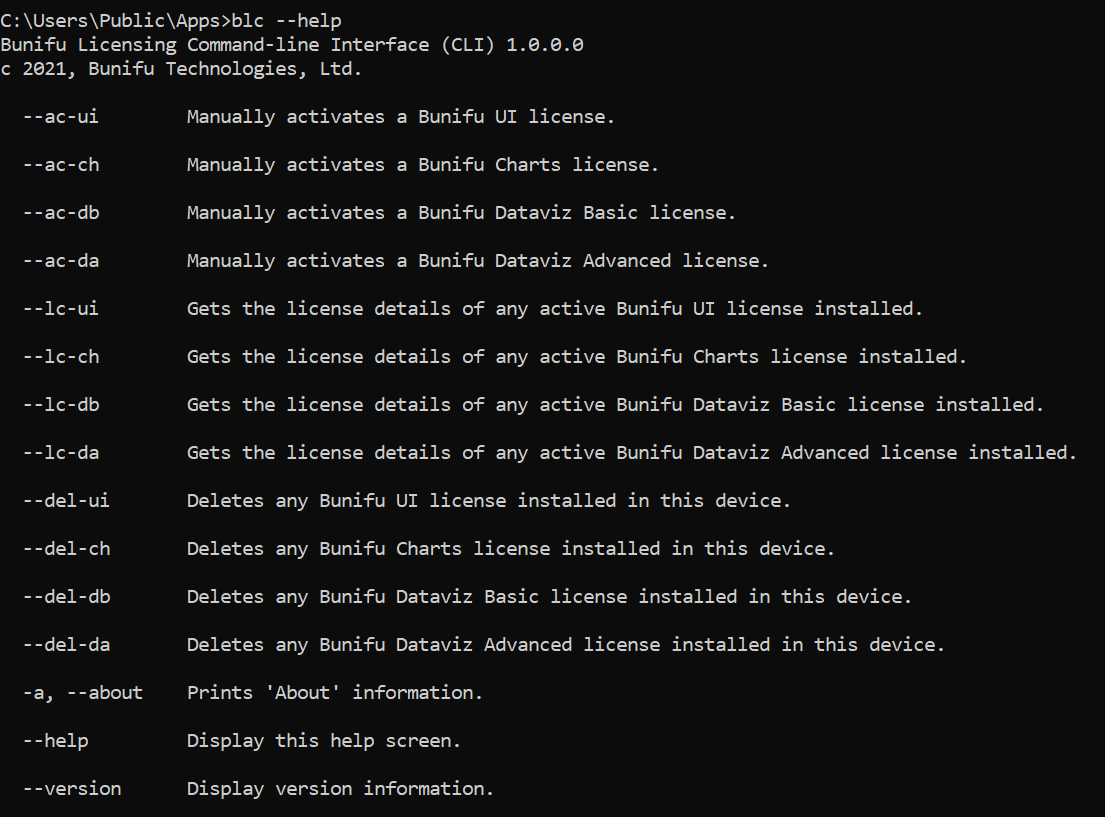
Usage
Bunifu Licensing CLI lets you:
- Activate your licenses
- View your license details
- Delete your licenses
Activating your licenses
Below are the list of products you can easily activate using the utility:
| Product | Command |
|---|---|
| Bunifu UI WinForms | blc --ac-ui |
| Bunifu Charts WinForms | blc --ac-ch |
| Bunifu Dataviz WinForms | blc --ac-dv |
For example, to activate your Bunifu UI WinForms license, run:
Viewing your licenses
You can also view your various purchased license details:
| Product | Command |
|---|---|
| Bunifu UI WinForms | blc --lc-ui |
| Bunifu Charts WinForms | blc --lc-ch |
| Bunifu Dataviz WinForms | blc --lc-dv |
Deleting your licenses
Likewise, you can delete each product's license in scenarios where you would, for example, want to reset any of your installed licenses:
| Product | Command |
|---|---|
| Bunifu UI WinForms | blc --del-ui |
| Bunifu Charts WinForms | blc --del-ch |
| Bunifu Dataviz WinForms | blc --del-dv |
To check the version you're using, simply run the command: And that's just about it! We hope this utility will help you in the long run to quickly manage your purchased license subscriptions.
Need Help?
If you face any issues while using the utility, please don't hesitate to reach out to us via our Support page.